

Payday arrives, the number looks a bit light, and your evidence is a notebook in the glovebox and a blurry photo of the rota. Sound familiar? A good hours tracker fixes that in about ten seconds a shift. Here are seven worth your time, and the honest catch with each one.
Which app is best for tracking work hours?
The best app depends on how you are paid: personal shift trackers like Timelog, Hours Tracker and Punch suit hourly workers, while Toggl Track suits freelancers billing projects.
| App | Best for | App Store rating | Price model |
|---|---|---|---|
| Timelog | Checkable pay and overtime per shift | New | Free + Premium |
| Hours Tracker: Time Calculator | End-of-day entries | 4.7★ (83K) | Free download |
| Hours Tracker: Time Tracking | Tips, mileage, geofencing | 4.8★ (56K) | Free download |
| Punch Time Clock | Simple punch clock | 4.8★ (36K) | Free download |
| Work Log - Shift Tracker | Complex pay periods | 4.8★ (4.5K) | Free download |
| Hours - Tracker & Time Clock | Live earnings ticker | 4.6★ (16K) | Free download |
| Toggl Track | Freelance project time | 4.8★ (9.6K) | Free on iOS |
Ratings and rating counts are from the US App Store in October 2026. Most of these apps offer optional paid upgrades; check each listing for current prices.
How did we pick these apps?
We judged each app on the five things that matter to someone paid by the hour: speed of clock-in, break and overtime handling, pay calculation, export, and how much a long-time user can trust it.
That last one matters more than it sounds. The most common complaint in hours-tracker reviews is not a missing feature; it is pay math that comes out wrong, or a free app that suddenly locks your history. So we weighted clear pay breakdowns and honest free tiers heavily, and kept the list to apps with real track records on the App Store.
Full disclosure: Timelog is our app, which is why it is first. We have put our criteria in the open, linked every other app's App Store page, and listed Timelog's own limits below, so you can judge for yourself.
The 7 best apps to track work hours in 2026
Timelog: Work Hours Tracker
by Timelog · iPhone
Why people like it: one tap to clock in, breaks deducted automatically, and every shift opened up into base pay and overtime lines you can check with a calculator. Split and overnight shifts just work, and the week's total is always on the home screen.
Best for: hourly workers who want to know, to the cent, what this week should pay.
The catch: iPhone only, no cloud sync, and overtime is calculated after a daily threshold you set (like 8 hours), not the 40-hour weekly rule. Overtime pay, extra jobs, export and history past 14 days are Premium.
Get Timelog on the App Store →
Hours Tracker: Time Calculator
by Appostrophe AB · iPhone
Why people like it: it is the classic: type a start and end time for each day, deduct your break, and it totals the week and your pay. Excel and CSV export are built in.
Best for: people who fill in their hours at the end of the day rather than running a live timer.
The catch: it is built around daily entries, so if you want to clock in live as you start, other apps on this list feel quicker.
View on the App Store →
Hours Tracker: Time Tracking
by Cribasoft, LLC · iPhone
Why people like it: it is the power-user option: timers with breaks and pauses, tips and mileage, earnings adjustments, and location reminders that can clock you in when you arrive at work.
Best for: people with tips, mileage or several job sites who like to fine-tune everything.
The catch: all those options take a while to set up. If you just want your hours and pay, it can feel like a cockpit.
View on the App Store →
Punch Time Clock
by Trent Morris · iPhone
Why people like it: clock in, take a break and clock out with single taps, fix a forgotten clock-out after the fact, and export a tidy PDF or CSV timesheet.
Best for: shift workers who mostly want a simple punch clock in their pocket.
The catch: it keeps things deliberately simple, so check its overtime and pay-period options against your job before you commit.
View on the App Store →
Work Log - Shift Tracker
by AR Productions Inc · iPhone
Why people like it: it thinks in pay periods: weekly, biweekly, twice a month or your own schedule, with overtime by shift, week or pay period and premium rates for nights and weekends.
Best for: people with complicated pay rules who want the app to mirror their paycheck exactly.
The catch: more rules means more setup, and you need to know your employer's pay rules to enter them correctly.
View on the App Store →
Hours - Tracker & Time Clock
by One Wave AB · iPhone
Why people like it: a live clock that shows hours and earnings by the minute during a shift, plus a weekly log of hours worked and salary earned.
Best for: people who like watching the shift total tick up as they work.
The catch: its weekly overview is the main view, so if you need detailed breakdowns per shift, compare it with the apps above first.
View on the App Store →
Toggl Track: Hours & Time Log
by Toggl OU · iPhone
Why people like it: start a timer on your phone and stop it from a browser or Apple Watch; everything syncs, and reports show where your time went.
Best for: freelancers billing clients by project, across several devices.
The catch: it is a project timer, not a shift-and-pay tracker. It needs an account, and hourly pay, breaks and overtime are not what it is built around.
View on the App Store →How do you choose the right hours tracker?
Pick the app that matches how you are paid, then test it on one real week before you trust it with months of records.
Start with how you are paid
Hourly with overtime? You need break deduction and an overtime multiplier. Billing clients by project? A project timer like Toggl Track fits better. Tips or mileage? Look at Cribasoft's Hours Tracker.
Check the pay math on one shift
Enter a shift you already know the answer to, say 8:00 AM to 7:00 PM with an hour's break at $45 an hour and 1.5× after 8 hours. The right answer is $495. If you cannot see how the app got there, keep looking.
Read the free tier carefully
History limits, job limits and export are where free versions usually stop. That is fine if you know up front; it is not fine in week six.
Make sure you can get your data out
A PDF for your boss and an Excel or CSV file for your own records means your hours are never trapped in one app.
Decide whether you need sync
Tracking on a phone and a laptop calls for a sync-based tool with an account. Logging on your phone alone means an offline app keeps things simpler and more private.
Why keep your own record if your job has a time clock?
Because your employer's time clock is their record, not yours: they control it, can edit it, and you may lose access to it the day you leave.
Most short paychecks are honest mistakes, like a missed punch, an "automatic" break you didn't take, or a late finish that never got entered. A record you made at the time turns "I think I worked more" into "here are the dates." Our guide on how to prove hours worked covers what to do next if the numbers don't match.
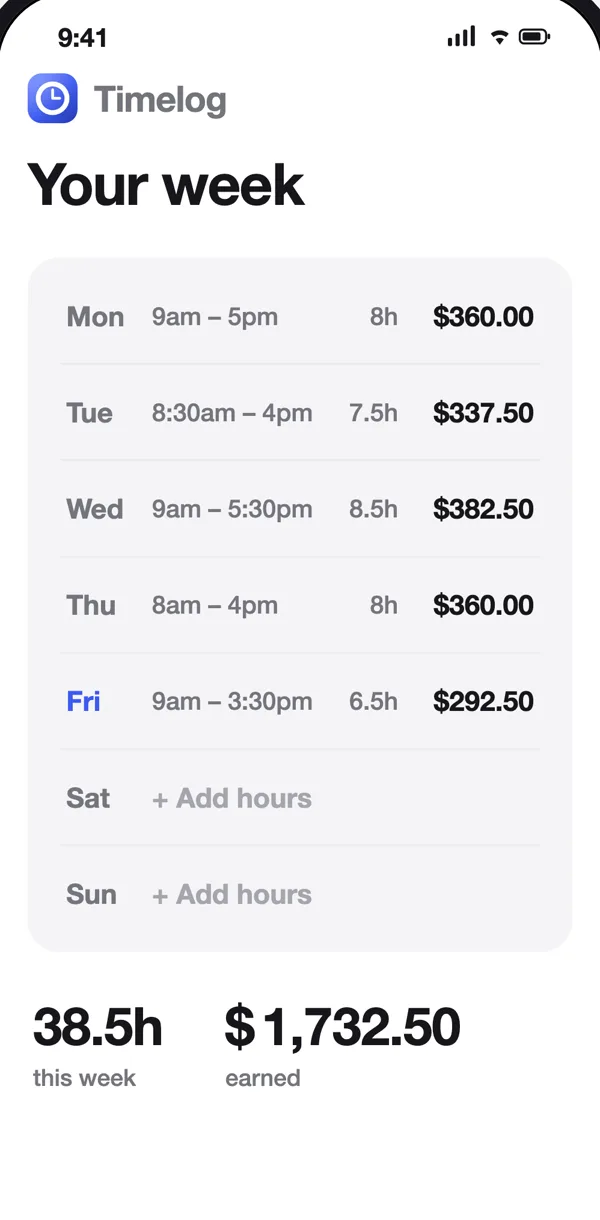
Want to check a week without installing anything? The free time card calculator does the same math in your browser, and our guide to calculating overtime pay explains the rules behind it.
Where does Timelog fall short?
Timelog is iPhone-only, has no cloud sync, applies overtime after a daily threshold rather than the 40-hour weekly rule, and is not a payroll or tax tool.
- iPhone only. There is no Android or web app yet.
- No sync. Shifts live on your phone. That is great for privacy and offline use, and less great if you switch phones without a backup.
- Daily overtime only. You set a threshold such as 1.5× after 8 hours a day. For the federal 40-hours-a-week rule, compare the week total on the Earnings screen with 40.
- Free vs Premium. Free covers one job, clock in and out, breaks and estimated earnings, with the last 14 days visible. Premium (a subscription with a free trial when eligible, or a one-time lifetime purchase) adds multiple jobs, overtime pay, PDF, Excel and CSV export and full history.
- Not payroll. No taxes, deductions, net pay, team management or GPS clock-in.